Introduction
The Forum is a place for discussion and debate on a spectrum of issues that affect Puerto Ricans or the Puerto Rican nation. Post your comments or questions here and respond directly to other postings.
Getting Started
The main forum page has a list of the ten most recent posts. To read a post and its comments, simply click on the post’s title or the “Comments” link immediately below the post.

Searching
Use the search box in the right-hand column to find posts and comments that contain a specific keyword or keywords.
Archives
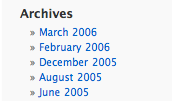
Also in the right-hand column is the list of archived posts. Click on a date to see posts from a particular month and year.
Calendar and Events
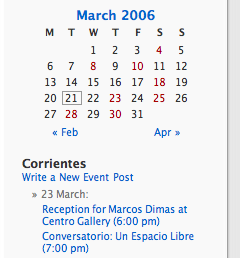
Below the search box in the right-hand column is this month’s calendar. Days in red indicate that there are one or more events that day. Click on the red day to bring up the list of that day’s events. Below the calendar under the heading “Corrientes” is a list of upcoming events. Clicking on the event’s title will bring up more information about the event.
Commenting on a Post
To comment on a post, click on the post and fill out the “Leave a Reply” form at the bottom of the page. You don’t need to register to leave a comment.
Writing a Post
Before you can write a post, you need to register. Once you have registered and logged in, you can write a post by clicking on the “Write a Post” link in the right-hand column.
From the “Write Post” page you can edit your post, save it and preview it. Once it is ready, click the “Publish” button. This will make it available on the site. From the “Write Post” page you are also able to set which category it belongs to (the default is “Topics”), its publish date, whether to allow comments and other settings. You are also able to upload pictures and other files using this page that you can then reference from the post.
Creating Calendar Event
To create a calendar event, click the “Write a New Event Post” or “Write a Post” in the right-hand column.
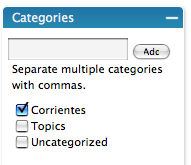
A calendar event is like any other post, except that its category needs to be set to “Corrientes”.
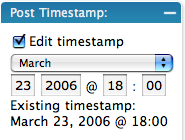
And its publish date should be the date of the event and not the current time which is the default. You need to make sure the “Edit timestamp” check box is selected for the date to get set.
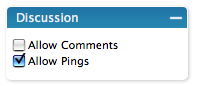
Optionally, you may also want to uncheck the “Allow Comments” box under the “Discussion” tab so people can’t post comments.
More Information
For more information on blogging see WordPress’s Introduction to Blogging page. For documentation on WordPress see the WordPress Docs page.